READY TO GET STARTED?
USEFUL LINKS

We respond to text! Message and data rates may apply. Reply STOP to opt out.
RECEIVE OUR NEWSLETTER
GET SOCIAL

News
Winter Storm Fern left more than 230,000 Tennessee households without power this January. While many families experienced extended outages, customers with solar and battery storage had a significant advantage: the ability to operate independently from the grid.
That said, having a battery system does not mean unlimited power. During an outage, your home transitions into what is known as a “microgrid.” In simple terms, you become your own utility company. How long your system performs — and how comfortably — depends entirely on how you manage energy consumption.
We want to take a moment to outline what that means in practical terms.
When the grid goes down, your battery system should automatically isolate from the utility and begin powering your home.
It’s crucial that you have your smartphone and/or tablet set up to receive alerts from your battery system. You can do this by going to your notifications settings, clicking the app, and turning notifications on.
We’ve had several clients not realize that the utility power was off. They continued to use electricity normally not realizing that they could have conserved their precious battery energy and unintentionally ran out of battery power. The quickest way to confirm your system’s status is through your monitoring app.
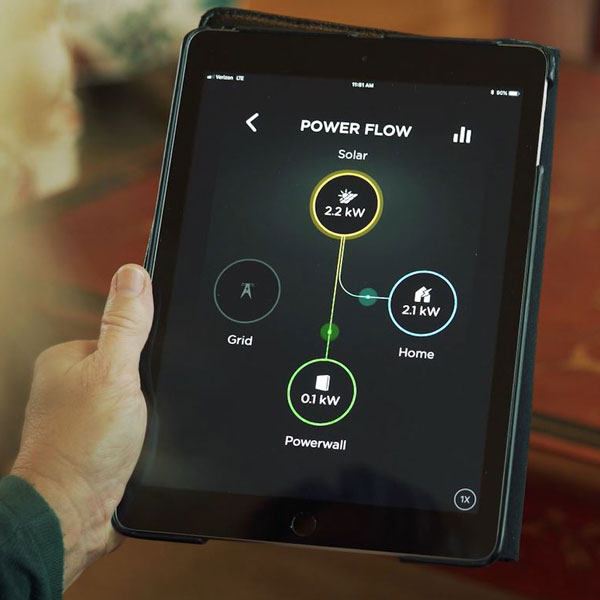
Open your battery's monitoring app and confirm:
If your system does not transition properly, many times the manufacturer is the fastest way to get the system back up and is many times our first call. Doing this expedites our ability to address any issue they were not able to remotely correct.
They have direct monitoring access and can quickly determine whether the system is functioning correctly or if service is required.
The vast majority of our systems perform exactly as designed. Issues during outages are rarely system failures — they are almost always load-related. This is why it’s crucial that everyone checks their system with their monitoring app during an outage.
Thankfully the vast majority, over 95% of our systems functioned without any issues. Shoutout to our customers during the recent ice storm that properly managed their loads and even offered shelter to friends & neighbors, like the Murdock family.
Our team does not have as much access to your system so will not be able to diagnose the problem as quickly as the manufacturer would.
The biggest misconception about battery storage is capacity. A battery can support essential loads very effectively, but large electric appliances can drain it rapidly or exceed its output limits. Electric heat strips, dryers, ovens, EV chargers, and electric water heaters are the most common culprits. These devices can pull thousands of watts instantly. If several operate at the same time, they can overwhelm the system.
During an outage:
The customers who performed best during Winter Storm Fern were those who actively monitored consumption and adjusted accordingly.
Homes equipped with Tesla Powerwall automatically separate from the utility and form a self-powered microgrid when the grid goes down. If severe weather is forecasted, Storm Watch may automatically charge the batteries to 100% in preparation for potential outages.
During an outage, the Tesla app becomes your primary tool. It provides real-time visibility into home consumption, solar production (if installed), battery state of charge, and grid status. Monitoring usage in the app is critical — it allows you to see load spikes as they occur and adjust accordingly.
As a general rule, a single Powerwall supports approximately 5 kW of continuous output. Multiple Powerwalls increase available capacity, but high-demand appliances such as electric heat strips, dryers, ovens, and EV chargers can still exceed system limits or drain stored energy quickly. Managing those loads is essential to maintaining stability during extended outages.
If your solar array is clear of snow or fallen trees and receiving sunlight, it will recharge the battery during daylight hours. However, snow-covered panels will produce little to no energy, meaning the home will operate strictly on stored battery capacity until production resumes.
If you experience unexpected shutdowns, persistent alerts, or behavior that does not appear normal, contact Tesla Energy Support first. Tesla can remotely access system data and determine whether the issue is related to load demand, system configuration, or equipment performance.
Homes equipped with systems from FranklinWH automatically isolate from the utility during a grid outage and begin powering the designated backup circuits. The transition is seamless, but performance during extended outages still depends on how energy is managed inside the home.
The Franklin monitoring app provides real-time visibility into battery state of charge, household consumption, and backup status. Some systems include advanced load management features, but no system can overcome sustained high-demand usage. Runtime ultimately comes down to disciplined consumption.
During an outage, monitor your state of charge closely. If battery levels begin to drop rapidly, reduce load immediately. Stagger appliance use, turn off non-essential breakers, and avoid running multiple heavy-draw appliances at the same time. These simple adjustments can substantially extend available runtime.
If you notice unexpected shutdowns, persistent alerts, or behavior that appears abnormal, contact FranklinWH support first. Their team has direct remote access to system monitoring and can determine whether the issue is related to load demand, configuration, or equipment performance.
For homes equipped with battery backup that charges from the grid but does not include solar, the operating reality during an outage is straightforward.
When utility power fails, the battery begins supplying your backed-up circuits immediately. However, without solar production, there is no way to replenish stored energy during the outage. Once the battery reaches its minimum state of charge, power to those circuits will remain off until the utility restores service.
Because there is no daytime recharge, conservation must begin at the start of the outage — not when the battery is nearly depleted. Reduce usage to essential loads only. Turning off non-critical breakers early can significantly extend runtime and prevent unnecessary shutdowns.

Monitor your battery’s state of charge closely through the manufacturer’s app. If you experience unexpected shutdowns, fault notifications, or behavior that appears abnormal, contact your battery manufacturer’s support team first. They have remote access to system data and can confirm whether the system is operating as designed or if a configuration or equipment issue exists.
If the manufacturer determines that on-site service is required, contact our team and we will coordinate dispatch and corrective action.
Winter conditions introduce another variable: panel coverage. Snow accumulation can significantly reduce or eliminate solar production. Ground-mounted systems are easier to clear safely. Roof-mounted systems should never be accessed during icy conditions.
If the panels are covered, your system operates as battery-only until production resumes.
In the rare situation that your system has an issue, our team is here to help. This could look like your system not transitioning into backup mode, displaying persistent faults, or it shutting down unexpectedly. In this rare case, please reach out to our team and we can help determine whether the issue is equipment-related or load-related.
Call: +1 (615) 641-4050
Email:
Online Service Request: lightwavesolar.com/customers/submit-a-service-request
Solar and battery storage provide meaningful resilience during severe weather. Winter Storm Fern proved that. But performance during extended outages comes down to informed usage.
Monitor your system. Prioritize essential loads. Conserve energy when the grid is down. This approach turns backup power from a short-term convenience into long-term reliability.